What are the best tools to turn a newsletter into social media posts?
The best tool depends on what you want to stop doing: writing the posts, scheduling them, or opening an app at all. Letterly, an autonomous agent, fits creators who want to hit send and leave social media alone that week. AI post writers such as Contentdrips fit creators who want to approve every post. Taplio fits creators who only post on LinkedIn. DIY automations in n8n or Make fit people who like to tinker. I am the founder of Letterly, so I am on this list, and I scored every tool with the same four filters.
Disclosure: I am Vicente Évora, the founder of Letterly, and Letterly is one of the tools below. I scored it with the same filters as the others and listed its trade-offs. This guide expands my LinkedIn article of the same name, published on 6 October 2026.
Who is this guide for?
This guide is for newsletter creators with roughly 500 to 5,000 subscribers who publish consistently but struggle to stay active on social media.
It suits writers on beehiiv, Substack, Ghost, Kit (formerly ConvertKit) and Mailchimp, and anyone whose newsletter has an RSS feed.
It is not for agencies that run 20 client accounts. It is not for video-first creators either, because almost every tool here starts from text.
The problem is easy to recognise. You hit send on an edition that took six hours to write. Two days later nobody remembers it, and your X and LinkedIn have been quiet all week because the newsletter used up everything you had.
A post on Reddit’s r/Newsletters puts the same problem in numbers: writing the issue feels like 20% of the work, and reformatting the same content for other socials feels like the other 80%. Read the thread.
What does it mean to turn a newsletter into social posts?
Turning a newsletter into social posts means taking a published edition and producing several short posts, threads or carousels from it. Each post is formatted for its platform and spread across the week.
One edition usually holds several standalone ideas. Those ideas can fill days of posting, instead of one announcement on send day.
The process has five steps:
Pick up the edition
A tool reads your newsletter from an RSS feed, a link or pasted text.
Split it into ideas
The tool finds the standalone points inside the edition.
Write each post
The tool rewrites each idea for X, LinkedIn or Facebook, ideally in your own voice.
Schedule the posts
The tool spreads the posts across the following days.
Publish
Posts go out on their own, or after you approve them.
The tools in this guide differ mainly in how many of these five steps they do for you.
What are the four types of newsletter-to-social tools?
Newsletter-to-social tools fall into four types, based on who does the work each week. AI post writers convert an article or recording that you give them. Schedulers help you write, queue and analyse your own posts. DIY automations are workflows you wire together in n8n or Make. Autonomous agents watch your newsletter feed, convert each new edition and schedule the posts without you.
The four types of newsletter-to-social tools
Type
Starts from
What you do each week
Examples in this guide
AI post writer
An article, link or recording you give it
Start each conversion, then review the posts
Contentdrips, Swell AI
Scheduler
Posts you write, with AI help
Write, queue and review the posts
Taplio, Hypefury
DIY automation
Whatever you wire up
Build it once, then fix it when it breaks
n8n or Make workflows
Autonomous agent
Your newsletter’s RSS feed
Nothing, or approve posts if you choose to
Letterly
How did I score the tools with the Letterly Four-Filter Test?
The Letterly Four-Filter Test is the method I used to score every tool in this guide, including my own. Each tool gets four yes-or-no questions, asked in this order:
Filter 1. Does it start from your newsletter, not from a blank prompt?
Filter 2. Does it publish to X and LinkedIn, where text-first creators mostly post?
Filter 3. Does it work without you reopening it every week?
Filter 4. Does it cost under $40 a month for one creator?
I wrote these filters for the creator I built Letterly for, so Letterly passes all four by design. Weigh that when you read the scorecard, and use the best-for section below if your priorities are different.
How each tool scores on the four filters, checked on 6 October 2026
Tool
1. Starts from your newsletter
2. Posts to X and LinkedIn
3. Works hands-off
4. Under $40 a month
Letterly
Yes. RSS feed, link or pasted text.
Yes. Both, plus Threads and Facebook.
Yes. The agent runs on its own.
Yes. $29 a month.
Contentdrips
Yes. Paste an article link and it makes carousels.
Partly. LinkedIn and Instagram, with no X.
No. You start each conversion.
Yes. Free, $15 or $26 a month.
Taplio
Not listed. Built for writing LinkedIn posts.
Partly. LinkedIn only.
No. You write and queue the posts.
Barely. Plans start at $39 a month.
Hypefury
Not listed. It starts from posts you write.
Partly. LinkedIn yes, X no.
No. You write and queue the posts.
Yes. $6 a channel, or $19 for all.
Swell AI
No. It starts from audio and video.
No. You copy the posts elsewhere.
No. You upload each recording.
Yes. Free, or $29 a month for 300 minutes.
DIY automation
Yes, if you build it that way.
Yes, for the platforms you connect.
Yes, until a step breaks.
It depends. Tool fees plus your time.
A cell that says “Not listed” means the vendor’s own page does not mention the feature. That is not proof that the feature is missing, so check before you rule a tool out.
How do the tools compare on price and platforms?
The six options differ most on platforms and price. Letterly costs $29 a month and posts to four platforms. Contentdrips costs up to $26 a month and publishes to LinkedIn and Instagram. Taplio starts at $39 a month and is built for LinkedIn. Hypefury costs $6 a channel or $19 for all channels, and it no longer supports X.
Price and platforms for each tool, checked on 6 October 2026
Hypefury’s own FAQ answers the question “Does Hypefury still support X?” with “Nope! Hypefury no longer supports X”. If X is where your readers are, rule it out first.
Which tool is best for which creator?
The best newsletter-to-social tool changes with your platforms, your budget and how much control you want. No tool here is best for everyone.
Which tool fits which creator
If you want
Look at
Your newsletter turned into posts with no weekly work
Letterly, an autonomous agent
LinkedIn and Instagram carousels from an article, started by you
Contentdrips
A LinkedIn-only growth toolkit
Taplio
Cheap scheduling for posts you write yourself, without X
Hypefury
Posts from a podcast or video recording
Swell AI
Full control, and you enjoy tinkering
A DIY workflow in n8n or Make
The lowest cost to try
Contentdrips’ free plan, or Letterly’s free plan with one full agent run
Is Letterly right for you?
Best for solo creators who want their newsletter turned into scheduled posts without opening an app each week. Letterly is an AI social media agent that turns every newsletter edition into a week of posts in the writer’s own voice. Here is what it does:
Runs on its own. The agent watches your RSS feed, converts each new edition, spreads the posts across the week and emails you when a run finishes.
Posts to four platforms. Letterly publishes to X, including X Communities, and to LinkedIn, Threads and Facebook Pages.
Uses your edition’s images. Letterly pulls the images out of each edition and attaches them to the posts they clearly match.
Writes in your voice. Letterly builds a persona from posts you have already published. Paste a link to your profile, and Letterly fetches up to 10 of your recent posts so you can pick the ones that sound most like you.
Writes from scratch. The AI composer writes a new post, pushes forward an idea from your past posts, or gives you three angles on a topic. No edition is needed.
Has a manual mode. In Convert, you paste an edition link or text, add your own instructions and approve each post yourself.
Covers the rest of the workflow. It adds a drag-and-drop calendar, tracked links back to your newsletter, AI images in your brand colours and logo, and follower growth analytics.
The trade-offs are real. Letterly has no Instagram or TikTok. Threads reuses your X content instead of getting its own writing. Facebook posts go to a Page, not a personal profile. AI image generation is capped at three a day. There is one plan at $29 a month, and one person builds Letterly, so a bug or two may still turn up.
Is Contentdrips right for you?
Best for LinkedIn and Instagram carousels from an article you already have, if you are happy to start each conversion yourself. Contentdrips turns a pasted blog link, a topic or a YouTube video into carousels and text posts, and publishes to LinkedIn and Instagram. Its pricing page lists a blog-to-carousel conversion at 15 AI credits.
The trade-off: X is not among its publishing platforms, and every conversion is manual.
Is Taplio right for you?
Best for creators whose only channel is LinkedIn and who want a full LinkedIn growth toolkit. Taplio describes itself as an all-in-one AI tool to grow your brand on LinkedIn, and its plans start at $39 a month.
The trade-off: Taplio is LinkedIn only, and $39 a month is the highest starting price of the paid tools here.
Is Hypefury right for you?
Best for scheduling posts you write yourself across several channels, cheaply. Hypefury costs $6 a month per channel or $19 a month for all channels. Its FAQ confirms Instagram, LinkedIn and Threads, and its site also lists Bluesky, TikTok and Mastodon.
The trade-off: its pricing page does not describe newsletter import, and its FAQ says it no longer supports X. Check that before you buy.
Is Swell AI right for you?
Best for creators whose source material is a podcast or video recording. Swell AI takes audio, video, podcast episodes and YouTube links, and writes transcripts, show notes, articles, newsletters and social posts from them. Its homepage lists plans at $0, $29 and $49 a month, plus $8.99 per 60 minutes pay as you go.
The trade-off: Swell AI is not built around text newsletters, and it does not publish the posts for you.
The trade-off: you pay for the tools and an OpenAI key, and when a step breaks you are the support team.
What happened when I ran a real newsletter through Letterly?
I ran one edition of my own newsletter, Notes to 10K MRR, through Letterly’s agent. This is a sample of one, so treat it as a single real run, not a benchmark.
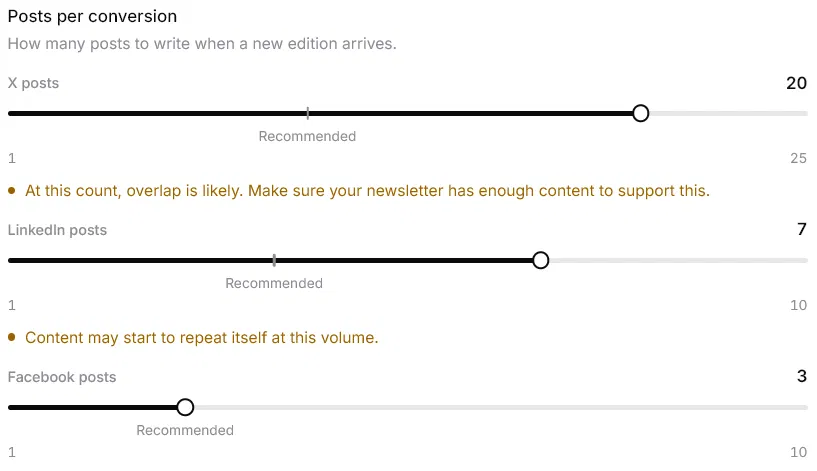
I set the post counts myself: 20 for X, 7 for LinkedIn and 3 for Facebook. Letterly warns that overlap is likely at 20 X posts, and that LinkedIn posts may start to repeat at 7. Push the sliders that far only if your edition has enough in it. Mine did.
The post counts for this run, as I set them in Letterly’s agent settings.
Here is what came out:
X 20
LinkedIn 7
Facebook 3
Clicks across all platforms
122
New subscribers
29
Edition images used
3 of 3
One edition, one agent run: 30 posts by platform, and what the edition brought back. These are the figures from my own run.
30 posts in total. That was 20 tweets, including a thread, plus 7 LinkedIn posts and 3 Facebook posts. Letterly delivered exactly the counts I asked for.
All 3 images used. My edition had three images. Letterly fetched all of them and attached each one to the posts it fit best, reusing the same image across different platforms.
122 clicks and 29 new subscribers. The edition brought 122 clicks across all platforms and 29 new subscribers.
No time in the app. I did not open Letterly to run it. My only edit afterwards was to add outside images to a couple of posts, because posts with media tend to perform better.
Nothing to fix in the writing.
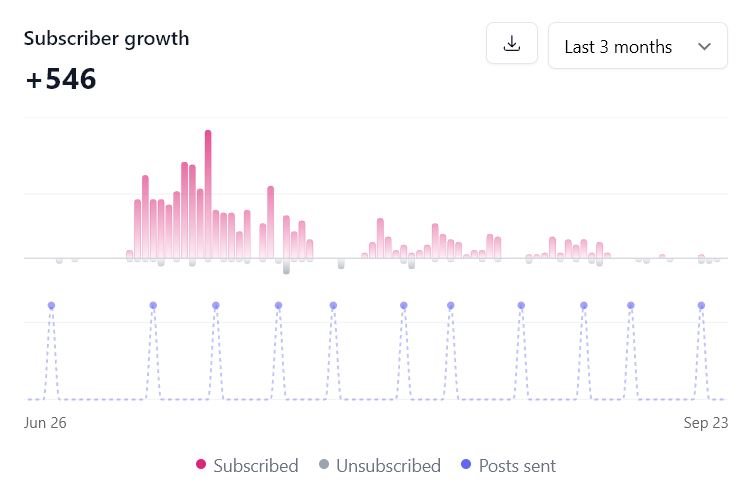
Over a longer stretch, my newsletter grew by 546 subscribers in the three months to 23 September 2026, while Letterly posted every edition for me. The chart is beehiiv’s own growth graph. It shows all growth, not growth by source, so it does not prove that Letterly caused it.
Subscriber growth for Notes to 10K MRR from 26 June to 23 September 2026, from beehiiv. The dots mark each edition sent.
What have real users said about Letterly?
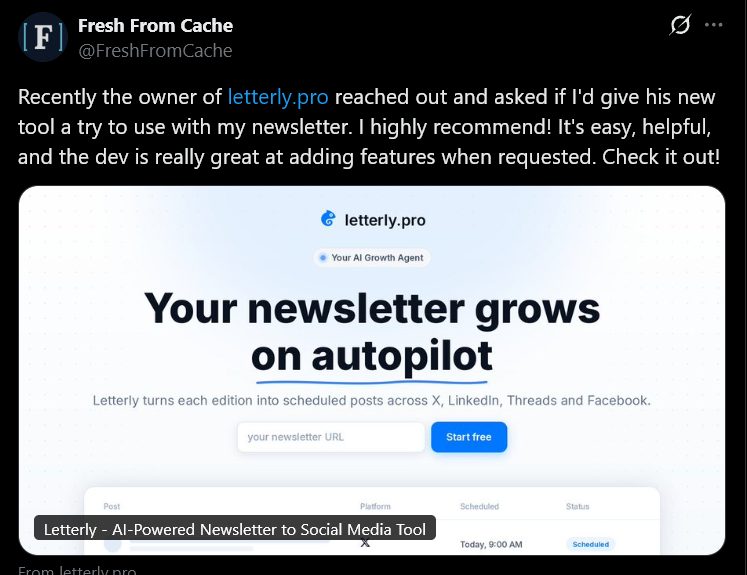
Twenty beta users ran Letterly before I charged anyone. Two people who use it have also written about it publicly on X. I picked these two quotes myself, so they are not a random sample.
“It's easy, helpful, and the dev is really great at adding features when requested.”
What does Letterly cost, and how long does setup take?
Letterly costs $29 a month on one plan that includes every feature and all four platforms. The first seven days are free, and the free plan includes one full agent run on your latest edition, so you see real posts before you pay. There is no contract, and you cancel from your settings whenever you want.
Setup takes about ten minutes. You sign up, paste your newsletter’s RSS feed, connect the accounts you want to post to and add a persona.
What happens after you connect your feed?
Letterly checks your feed every 30 minutes, so it picks up a new edition within about half an hour of publishing. It writes the posts straight away and spreads them over the following days, by default up to three a day on X and two a day on LinkedIn.
How much control do you keep?
Manual: you approve every post.
Light Touch: posts go out on schedule unless you step in during an approval window of 1 to 24 hours.
Full Auto: the agent publishes without asking.
An emergency stop halts the agent at once, and nothing already queued slips through.
Letterly emails you when a run finishes, when your queue of posts runs low and when a post fails to publish. Everything else lives in your calendar.
Support comes from the founder. Write to vicente@letterly.pro and I reply within 24 hours.
What are the risks and common mistakes?
Turning a newsletter into social posts goes wrong in a few predictable ways. Most of them are avoidable.
Choosing a tool that skips your platform. Hypefury no longer supports X, and Contentdrips publishes to LinkedIn and Instagram only. Check the supported platforms before you pay.
Asking for too many posts. One edition holds a limited number of ideas. Letterly warns that X posts may start to repeat at 16 per edition and that overlap is likely at 20, and that LinkedIn posts may start to repeat at 7.
Trusting posts you have not read. Read the first few posts from any tool before you let it near your account.
Going fully automatic on day one. Start on an approval setting, then move to hands-off once the posts sound like you.
Expecting a guaranteed result. No tool can promise subscribers. Posting consistently gives more people a chance to find you, and results depend on the posts and your audience.
Underestimating DIY upkeep. A workflow you build yourself is cheap to start. When an API changes or a step fails, you are the support team.
Trusting old prices. Prices and platforms change often. Check the vendor’s own page on the day you buy.
How do you choose the right tool?
Choose by answering three questions, in this order.
Where do your readers actually come from?
If they come from X, LinkedIn, Threads or Facebook, skip the tools built around Instagram and TikTok.
Do you want to approve every post, or let it run?
Approving every post points to a writer or scheduler. Letting it run points to an agent.
What will you pay each month?
Cheap tools usually cost you time instead of money.
What should you check before you buy?
Which platforms the tool publishes to today, from the vendor’s own page.
Whether it starts from your newsletter or from a blank prompt.
Whether you can approve posts before they go out.
Whether there is a free plan or a trial, so you can read real posts first.
How you cancel.
What should you do next?
If an agent fits, start a free trial of Letterly and connect your RSS feed. If a writer or scheduler fits, start from the price and platform table above and open the vendor’s own page.
Can I turn a newsletter into social posts automatically?
Yes. Tools that watch your RSS feed can detect a new edition, write the posts and schedule them. Letterly does this for X, LinkedIn, Threads and Facebook.
What is the best tool to turn a newsletter into social media posts?
It depends on what you want to stop doing. Letterly is built for creators who want it fully hands-off, Contentdrips for creators who start each conversion themselves, Taplio for LinkedIn only, and n8n or Make for people who like to build their own.
Which platforms does Letterly post to?
X (including X Communities), LinkedIn, Threads and Facebook Pages. Threads reuses your X content, and LinkedIn and Facebook posts are written separately.
Can I write posts from scratch instead of from a newsletter?
Yes. Letterly’s AI composer lets you write a post, generate one from your past posts, or get three angles on a topic. No edition is needed.
Will Letterly use the images from my newsletter?
Yes. Letterly pulls the images out of your edition and attaches them to the posts they clearly match. A post with no good match goes out without an image.
Will the posts sound like me?
Letterly builds a persona from posts you have already published, so each post follows your voice. You can edit any post before it goes out, and you should read the first few from any tool before you trust it with your account.
Does Letterly work with beehiiv or Substack?
Yes. It works with any newsletter that publishes an RSS feed, including beehiiv, Substack, Ghost, Kit and Mailchimp.
How much do these tools cost?
The tools in this guide range from free plans with limits to $39 a month and up. Letterly costs $29 a month on a single plan, with a 7-day free trial.
How long does it take to set up Letterly?
About ten minutes. You sign up, paste your RSS feed, connect your accounts and add a persona.
Can I approve posts before they publish?
Yes. On Manual you approve every post, and on Light Touch you get an approval window of 1 to 24 hours before each post goes out. Only Full Auto publishes without asking.
Is Letterly an alternative to Taplio, Hypefury or Contentdrips?
For newsletter writers who want posts written and published from each edition, yes. If you only post on LinkedIn, Taplio is the better fit. If you mainly want to schedule posts you write yourself, a scheduler is simpler.
Will repurposing grow my newsletter?
I cannot promise a number. Posting consistently gives more people a chance to find you, but results depend on the posts and your audience. My own newsletter grew by 546 subscribers in three months while Letterly posted every edition, and I cannot prove that Letterly caused all of it.
What should I check before I buy a newsletter-to-social tool?
Check which platforms it publishes to today, whether it starts from your newsletter, whether you can approve posts first, whether there is a free plan, and how you cancel. Use the vendor’s own page, because prices and platforms change.
What changed since the last update?
First published on letterly.pro. It expands my LinkedIn article of the same day with a four-filter scorecard, a price and platform table, a setup section, a risks section and more answers. I re-checked every price and platform list against the vendor’s own page on this date.
About LetterlyHow the agent works, the autonomy levels and the key facts.
About the author
Vicente Évora
Founder of Letterly
Vicente writes Notes to 10K MRR, a weekly build-in-public newsletter on beehiiv, alongside university and a part-time job. Every edition went out on time, and the social posts that were supposed to follow it never did.
He built Letterly to write those posts for him. It started as an idea on 26 November 2024, and the first version shipped in January 2025. Letterly is built and run by one person, and Vicente answers support email himself.